
LinkedIn New Job Announcement
You landed a new job - Congrats! After letting others within the organization know, externally announcing your career change via LinkedIn is one of the next steps.
While there’s not necessarily a right and wrong way to go about it, you should follow a few rules.
Questions Answered
-
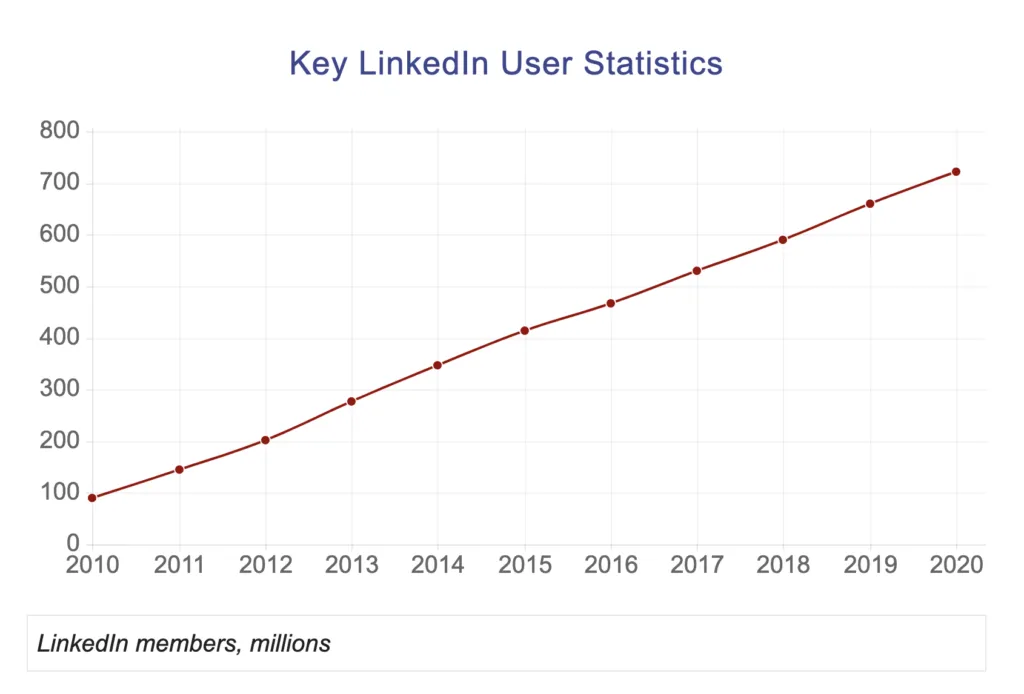
LinkedIn member count through the years
-
When should I announce my new job on LinkedIn?
-
How to announce your new job on social media
-
Posting New Job Announcement LinkedIn Examples
Does LinkedIn automatically announce a new job?
Your default settings on LinkedIn will share new job updates, education changes, and work anniversaries with your current connections. You can choose to disable this feature by following the steps listed below:
-
Click on the “Me” icon
-
Select “Settings and Privacy”
-
Click “Visibility”
-
Click “Change” next to Share profile updates with your network
-
Switch to “No” to stop sharing your profile edits
When should I announce my new job on LinkedIn?
It would be best if you looked to announce a new job on your LinkedIn profile within the first 1 to 3 weeks of employment.
Ideally, you would announce after the previous job ends but before the new job begins. However, most employees are busy until their last day of employment and then jump straight into their new roles, leaving minimal time to make that update.
What to Do After You Announce Your New Job on LinkedIn?
Once you have announced your new job on LinkedIn, look to connect with your new colleagues and reach out to past coworkers. Strengthening old relationships and building new ones is crucial to succeeding in the current world of work.
https://www.youtube.com/watch?v=sJz9TTnd4WU
How to Announce Your New Job on LinkedIn
Announcing your new position on LinkedIn or any other social media channel can be broken down into three straightforward parts:
1. Thank Your Old Employer
Thanking your previous employer by highlighting what you’ve learned (accomplishments) and how grateful you were for your time with them.
You can also mention specific managers or others within the organization that positively impacted your career.
2. Explain What You Are Doing Next
These social media announcements are important for employment changes, as they keep your network informed on what’s happening within your career.
For the content itself, look to keep things simple. Write a few high-energy sentences about where you will be going (the new company), what you will be doing (your new job title), and why you are excited to join the company.
3. Post the update and prepare for Replies
Once the update is posted, you will likely get a mix of different "congratulations" and "why are you leaving" responses from people online.
Feel free to respond to these if you'd like, but I've always waited until after the post dies down before responding to anyone.
LinkedIn Announcement Examples
Here are a few approaches you can take when announcing your new role to the world. Feel free to run with the option that best suits you or customize it to your liking:
Example #1
Posting a single status around leaving your current role and starting another.
- Single Status Example: (Date) is my last day with (Company). It has been an exciting journey working as a (Title), and I would like to thank the (Company) team for their ongoing support. I’m thrilled to be joining (Company), where I will contribute to their team as a (Title). I can’t wait to grow and learn during this new chapter in my life!
Example #2
Post a status about you leaving a current role and follow it up shortly after with another post announcing your new position.
-
Initial Status Example: (Date) will be my last day with (Company). Working as a (Title) over the previous (Years Employed) has been an exciting journey, and I would like to thank everyone for their ongoing support and love.
-
Follow-Up Status Example: I’m excited to announce that I’ll be taking on a new role as (Title) with (Company). I’ll be working on (Tasks/Goals) and can’t wait to see where this new chapter of my career will take me! Cheers
Example #3
“I’m excited to announce that I have accepted a new position as (Title) at (Company). Thanks to all of my coworkers, friends, and family who have supported me during this transition. I can’t wait to start this new adventure working alongside some great minds in the (department you are working).”
Example #4
“I’ve recently decided to make a career change and am now working as a (Title) at (Company). I appreciate everything (Old Company) has done for my career, and I'm excited to see what the future holds in my new role. Thanks for all of your help and support!”
Example #5
“It has been a great experience working as (Old Title) at (Old Company), but an amazing opportunity recently came up that I have accepted. I am extremely thankful to (Old Boss) and all my old colleagues for the support over these last (Years You've Worked) years. I will be taking on the (Title) position at (Company) - helping them grow their organization within the Dallas area."
Related:
Wrapping Up | How to announce a career change
Properly closing out your past job and announcing your future career can help start things off correctly. Notifying others within the social media realm (specifically LinkedIn’s massive network) with a quick and easy message will do wonders for your career.
Simply touch on your past accomplishments, thank your old employer for everything they’ve done, and show excitement about your future opportunity.
Good luck with your new job!
What’s Next? Here are a few first-day-of-work tips to help and some reasons to call out of work for those rough days.

Title: How to Announce Your New Job on LinkedIn
Category: theFinish
Tags: how to announce your new job on LinkedIn, announcing my new job on LinkedIn, when to announce a career change, when can you put your new job on LinkedIn
Author: Reid is a contributor to theJub. He's an employment and marketing enthusiast who studied business before taking on various recruiting, management, and marketing roles. More from the author. | Author Profile